Is My Partner Tracking My Phone? Read This Before You Go Looking
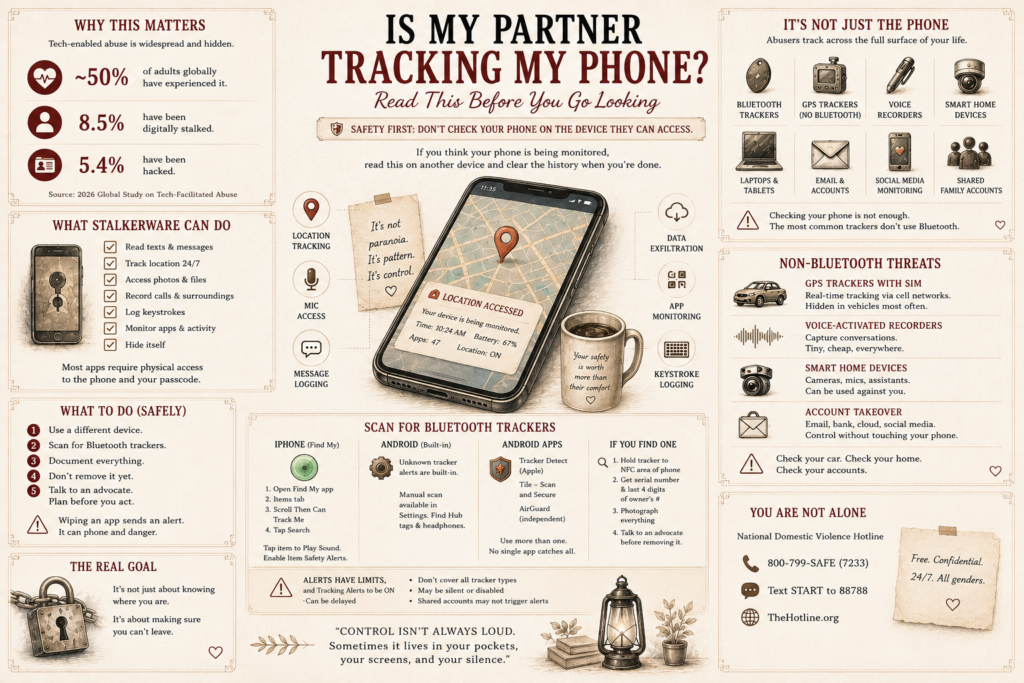
If that question brought you here, start with the part almost nobody puts first.
Don’t go hunting through your phone tonight, and don’t delete anything you find.
Monitoring software tells whoever installed it the moment it comes off. Every advocate who works on this says the same thing, and the reason is grim: the most dangerous stretch in an abusive relationship is when a person starts asserting independence or getting ready to leave. Wiping an app is a message. It says I know, and I’m doing something about it.
There’s an order to this, and the order matters more than the technical part.
Also, if you think your phone might be watched, read the rest of this on a different device. A friend’s phone, a work computer, the library. Then clear the history on whatever you borrowed.
How common this is
A global study released in 2026 found that 45.7% of people had been through some form of tech-enabled abuse in the previous twelve months alone, and that only about a third could correctly say what the term meant. About 8.5% reported being digitally stalked and 5.4% had been doxxed.
The tooling is an industry. Researchers identified 33 previously unseen stalkerware families in a single year, sold through a working market.
Installed on a phone, that software can read your texts, open your photos, follow your location all day, log what you type, record calls, and watch which apps you use and for how long. Almost all of it needs physical access to your phone and your passcode, which narrows the list of candidates to people who have both.
It is not just the phone
This is the part that surprises people, and it’s why checking your phone and stopping there leaves most of the doors open. Here’s the whole surface, roughly in the order it gets used.
Bluetooth trackers. Apple AirTags are the common one, and there are Tiles, Samsung SmartTags, Chipolos and others. Coin-sized, cheap, battery lasts about a year. They turn up in car wheel wells, under bumpers in magnetic cases, in spare tire wells, under seats and floor mats, in trunk linings, sewn into a coat, in a bag pocket, in a kid’s backpack.
How to scan for one. On an iPhone, open the Find My app, go to the Items tab, scroll to Items That Can Track Me, and tap Search. It takes about ten seconds. Anything it finds you can tap and Play Sound to locate. Make sure Item Safety Alerts is switched on while you’re in there.
On Android, unknown tracker alerts are built in and there’s a manual scan, though it covers AirTags, Find Hub network tags and headphones rather than everything. Apple also puts out a free app called Tracker Detect for Android 9 and up that hunts specifically for AirTags. Tile has its own scan inside the Tile app, called Scan and Secure, and it runs on both phones. AirGuard is a well-regarded independent option.
If you find one, don’t pull it out yet. Hold it against the top of an iPhone, or any Android with NFC, and a notification comes up showing the tracker’s serial number and the last four digits of the owner’s phone number. That’s identification, and it’s evidence. Photograph the tracker where it sits, photograph that screen, then talk to an advocate before you move it.
What the alerts do and don’t catch. They fire when a tracker is separated from its owner and moving with you, which is exactly the situation you’re worried about. They’re at work, you’re driving across town, the tracker is riding with you and nowhere near them. That should trip a notification, and often it does.
But treat a quiet phone as incomplete information, not as an all-clear, for these reasons.
The warning lives on your phone, not on the tracker. Nothing gets switched on or off at their end, it’s simply paired to their account. But your phone can only alert you if Bluetooth is on, location is on, and tracking notifications are enabled. Those are on by default on newer phones, so most people are covered. What’s worth knowing is that anybody holding your passcode can turn them off, and nothing announces it. If you’ve ever handed over your passcode, and most married people have, that’s a switch somebody else can reach.
They aren’t instant. It can take a stretch of travel before your phone decides something is following you, so a short trip may finish before anything says a word.
Coverage is uneven. Android’s built-in alerts don’t cover every brand of tracker, and older phones and other operating systems handle it differently or not at all.
The speaker can be silenced. Trackers with the speaker removed or muffled are sold on purpose, so the noise that’s supposed to give one away never comes.
And the one that matters most in a marriage: if the tracker sits on a shared family account, or an account you’re part of, your phone may not see it as unknown at all. It isn’t a stranger’s device. It’s the household’s. Nothing flags, because as far as the software is concerned, nothing is wrong.
So run the scan, and then put your hand in the wheel wells anyway.
The kind that doesn’t use Bluetooth at all. Everything above finds trackers that talk to phones over Bluetooth. There’s a whole shelf of hardware that doesn’t, and it’s cheap now. Thirty or forty dollars, ordered online, no expertise required.
GPS trackers with a SIM card in them. These run on the cell network instead of Bluetooth, report position in real time, and often come in a magnetic case built to sit under a car. Your phone will never warn you about one, because it isn’t looking for it. If you scanned for AirTags and came up clean, you have not cleared your car.
Voice-activated recorders. Pen-sized, keychain-sized, or built into a USB stick. Most just record to internal storage and get collected later, which means they broadcast nothing at all. That makes them the hardest thing on this list to find, because there’s no signal to catch.
Hidden cameras. Sold inside phone chargers, alarm clocks, smoke detectors, air fresheners, picture frames, power strips. Many stream over the house wifi, which is what makes those findable.
How you’d actually look. An RF detector is the practical tool, a handheld thing for well under a hundred dollars that picks up devices transmitting a signal. It’s what finds live cameras, cellular GPS units, and transmitting bugs. Understand its limit though: a recorder saving to its own memory is transmitting nothing, and no detector on earth will hear silence. For those it’s your hands and your eyes.
For cameras, kill the lights and sweep slowly with a flashlight, watching for the small hard glint a lens throws back. And go through the ordinary objects nobody ever picks up, the smoke detector, the clock, the charger nobody claims, the vent, the stuffed animal in a child’s room.
The router deserves its own paragraph. Anything streaming video has to reach the internet, which means it has to be on your wifi, which means it shows up in the list of connected devices on your router. That’s the single best view you’ll get of what’s in your house.
Three things to know before you go looking.
They probably control it. The router is usually in the account holder’s name, and plenty of them email that person when somebody signs into the admin page. So the most useful check on this page is also one of the likeliest to announce you. Talk to an advocate first.
The names will be no help. You won’t find one labeled camera. You’ll get a string of letters and numbers, or a chipset maker you’ve never heard of. So don’t try to spot the bad one. Count instead. Add up every device that belongs on that network, the phones, laptops, TVs, thermostat, printer, consoles, tablets, and see whether the total matches what’s listed. It’s the number that tells you something, not the names.
And plenty of it never touches the wifi at all. A camera recording to a memory card, a GPS unit on the cell network, a voice recorder saving to itself. None of those appear on any router. A clean list is not a clean house.
For a car, that’s wheel wells, under bumpers, the spare tire well, under seats and mats, and the trunk lining.
One more time, because it matters more here than anywhere else on this page: if the person finds out you’ve been searching, that alone can escalate things. Advocates say so plainly. Make the call before you make the sweep.
The car. Modern vehicles report their own position. If the connected app is registered to their account, they can see where the car is and where it’s been, and on many models lock, unlock, or start it. This one gets missed constantly because people think about phones, not driveways. Check whose name and email the vehicle app is under.
Family and shared accounts. Apple Family Sharing, Google Family Link, a shared Apple ID. These can hand over location, purchases, photos, and sometimes messages, all through a setup that looked completely ordinary when it was created for the kids.
Cloud backup and photo sync. If your photos sync to an account they can reach, they see your photos. Same for notes, documents, and full phone backups. Nothing has to be installed for this to work. It’s just a shared login.
Location sharing apps. Find My, Google, Life360. Consented to, mutual, and the most common version by a mile. More on this below, because it’s the confusing one.
Smart home devices. Doorbell cameras log who comes and goes and when. Indoor cameras, thermostats, and smart locks all keep a record. Voice assistants keep activity histories. If the account is theirs, the history is theirs.
Wearables. Watches and fitness trackers carry location, activity, and sleep. A shared health app is a timeline of your body and your movements.
The phone plan. The account holder can pull statements showing every number you called or texted and when. No software needed, just the login for the carrier account.
Streaming and small accounts. Netflix and the rest show what was watched, when, and roughly where. Rideshare and delivery apps keep address histories. These are the ones nobody thinks to check.
Account recovery. This is the quiet one. If their email or phone number is set as the recovery contact on your accounts, they can reset your passwords whenever they want, and you’d never know until you were locked out.
The kids’ devices. A child’s tablet or phone, logged into a family account, can report location and activity from wherever it happens to be sitting. Which is usually next to you.
Signs something is on your phone
None of these proves anything alone. Phones age and batteries wear out. But this is what technicians look at.
The battery dies noticeably faster than it used to. That’s the most reliable single sign, because monitoring runs constantly and constant work costs power.
Data usage jumped and nothing explains it. Everything collected has to be transmitted somewhere.
The phone runs hot, lags, or stalls opening things it used to open fine.
There’s an app you don’t remember installing and it didn’t come with the phone.
And the one people notice long before they check anything: they know things they shouldn’t. Where you stopped. Who you saw. Something you typed and deleted.
The version most people actually have
Most people reading this don’t have secret software on their phone. They have an app everybody agreed to and a feeling they can’t justify.
Mine was location sharing. It started for sensible reasons, the way these things do. Kids, schedules, ordinary family logistics. The girls grew up and out of it. The app stayed.
One Tuesday I drove to Oregon City for brake pads and didn’t put the trip on the calendar first. By the time I got to the checkout line my phone had buzzed twice. Where are you. Then, the app says the auto parts place?
I stood there holding a box of brake pads, typing an explanation, adding a smiley face to keep the response friendly.
The man behind me in line bought a battery without having to explain the purchase to anybody.
Nothing about that is criminal. Nothing about it would sound like anything if I described it at a barbecue. I had the same app. I could see her dot as easily as she could see mine, and I never once looked. Forty minutes at the feed store turned into forty minutes I had to account for, and I’d start drafting the account somewhere around minute ten.
That was the cage. Not the app. The composing.
Where the line actually is
Plenty of couples share locations and it’s completely fine, the same as plenty of couples share a bank account. The tool isn’t the problem. If you’re waiting for somebody to tell you that location sharing is abusive by nature, that isn’t what this is.
The line is the same one that runs under every other kind of control, and it has nothing to do with technology.
Could you turn it off? Not whether you want to. Whether you could say “I’m switching this off for a while” without paying for it in mood, silence, or two bad days. If that sentence makes your stomach drop, you already have your answer.
Does it run both ways in practice? Mine was technically mutual and functionally one-directional. The technically part is what kept me from seeing it for years.
Are you being asked, or audited? There’s a difference between “saw you were downtown, everything alright?” and a question you have to answer.
Do you compose? This is the real one. If you’re drafting the explanation before anybody asks, in a checkout line, in your head, about brake pads, you’re not in a relationship with an app. You’re in one with an auditor.
Is it growing? Over years, does the watching settle down or expand?
What to do, in this order
1. Move to a device they can’t reach. Everything from here happens on a borrowed phone or a public computer, including reading about this.
2. Call an advocate before a technician. The National Domestic Violence Hotline is free, confidential, and open around the clock, and tech safety planning is routine work for them. You don’t have to be leaving. You don’t have to be certain. There are also advocates who specialize in exactly this through the Safety Net project at the National Network to End Domestic Violence, and survivor guidance from the Coalition Against Stalkerware.
3. Keep a log, and keep it somewhere else. Date, time, what happened, what they knew and how they could have known it. Advocates use these, courts accept them, and it protects you from the argument that you’re imagining it. Store it on the borrowed device or a new account they’ve never seen.
4. Preserve, don’t erase. Anything on your phone is also evidence, and it may matter for a protective order later. Deleting it destroys the proof and warns them at the same time.
5. Then deal with the devices, with help. A factory reset is usually cleaner than hunting individual apps, and a new phone with a brand new account is cleaner still. Work down the whole list above, not just the phone, and change recovery emails and phone numbers first. Changing a password does nothing if they control the reset.
6. Do the car and the house too. Vehicle app ownership, doorbell and camera accounts, smart locks, the carrier account. And put your hand in the wheel wells.
The part worth holding onto
You’re not paranoid for asking. Half of adults have lived some version of this and most never put a name to it, which means the odds you’re imagining things are worse than the odds you aren’t.
And it was never really about software. Somebody with an app knows where your car is. Somebody with control knows you’ll have the explanation ready before they ask for it.
Every time you draft that explanation in your head, standing in a line somewhere, that’s a piece of your own day handed to somebody who wasn’t even in the room.
Control rarely shows up in one place only. The wider pattern is in Is It Abuse If They Never Hit You?, and the money side, which travels with this more often than not, is in Financial Abuse: When You Have to Ask for Your Own Money.
This reflects personal experience and research, not legal or technical advice. If you think you’re being monitored, or you’re worried about control or abuse in a relationship, the National Domestic Violence Hotline offers free, confidential support 24 hours a day to people of all genders. Call 800-799-SAFE (7233), text START to 88788, or chat at TheHotline.org. Use a device you believe is safe. If you’re in immediate danger, call 911 or your local emergency service.